All posts by remotehelpexpert

Types of Wireless Connections

What was I thinking? I’ve covered a big bunch of basic computer subjects in the last couple of years and I left this one out. Well, not anymore.

Wireless Connections

There are several different types of wireless connectivity:

1. Wi-Fi (stands for Wireless Fidelity): Either installed internally in a computer or plugged through a USB port, devices that use Wi-Fi allow you to connect your computer, through radio frequency (wirelessly) and a relatively short range, to a device that in turn connects to the Internet. Typical scenario could be at home, where you have a device that connects to a phone line or TV cable connection (from which it achieves Internet connectivity), and then it broadcasts the signal to all rooms at home, wirelessly. Or maybe an Internet Cafe, where customers bring their laptops and connect to the local wireless network. Bottom line, for your Wi-Fi-equipped computer to be able to have Internet access, a relatively close-by device needs to be in the vicinity, transmitting a wireless signal and connected itself to the Internet through a wire.

2. Bluetooth: A proprietary radio frequency technology similar to Wi-Fi, it allows you to connect (“pair”) two devices — such as your computer and a mouse, or your cell phone and a headset — so they can interact. Typically, the range is shorter than with Wi-Fi, i.e., roughly within a room.

3. Mobile broadband: Generally speaking, these are devices that can achieve Internet access using your cell phone network, so they are not dependent on a nearby device transmitting a signal they can receive. We’re now talking about cell towers that provide connectivity in the same way that they allow you to make a phone call from your cell phone. These can be subdivided into two types:

a) Mobile broadband cards: These are devices that attach to your computer, whether internally or through a USB port, and provide such mobile broadband connectivity to one computer. Like your cell phone, they require a subscription to a service that will allow such connectivity.

b) Mobile hotspots: These are devices that use mobile broadband technology to receive an Internet connection signal from a long distance, and then use Wi-Fi technology to broadcast it to several computers simultaneously. Again, a subscription to a service plan is required to use it.

Note: Nowadays, some cell phones can serve as 3a), 3b), or both 3a) and 3b) above, and even have, at the same time, Wi-Fi receiving capabilities as in 1 above.
Cloud Computing – a Bittersweet Virtual Reality

Two of my favorites inadvertent oxymora, they sum up and define where computing seems to be headed for. What is cloud computing? And what, if anything, does it have to do with the average Joe as a computer user? Read on.

The Cloud, as covered before, is of course referring to the Internet. Therefore, cloud computing refers to the model in which data is kept and software is run outside the physical location where the user and his computer are. Facilitated by the inter-connectivity provided by the Internet, this model is possible today and in fact, to some degree many users are already, well, using it. Examples of it are: Web-based email where the user logs on to a website to read and write emails, cloud-based malware detection like the Panda Security model where large servers are processing and classifying malware samples and supplying that information to the user’s computer, online backup services, just to name a few.

It seems like migration to cloud computing is going to continue at an increasingly faster rate. Google’s whole model for businesses is heavily dependent on it. Windows cloud based services (Azure), although a little late compared to Google,  is being developed, etc. The question is, is this beneficial or detrimental?

Covering in detail all the relevant data needed to make an adjudication would escape the scope of this brief article. However, 3 main elements are the main concern of those that tend to oppose the model: Privacy, security, availability (control).

Privacy and security concerns become obvious at a glance, when one considers the current day news on computer breaches such as hotmail servers being hacked and passwords stolen, the recent Epsilon security breach disaster, on and on.

When it comes to availability and control, the fundamental problem is, of course, that the individual or even a single company is not in control of the Internet, while factors like a cyber-security bill would give a president the power to flip an internet kill switch that would render cloud computing systems useless. Plus the remote computers the cloud computing system is based on are not necessarily under the normal user’s control either.

In summary, while the concept of the model is not detrimental per se, the above factors, if not handled, will probably corrupt the model and make it more a liability than an asset. In an utopic world, with no security or availability/control concerns, implementation of the model would probably be considered evolutionary.

Fake Windows Diagnosis Programs

I was able to see one of the newest fake Windows Diagnosis infections in the wild, and wanted to warn you about it. There are several of them and you might get all of a sudden one or more alarming windows telling you that your system or hard disk drive has several errors and a scan with an advanced module is in order, and then an attempt to coerce you into paying for that advanced module. All these alerts are of course fake and should be ignored.

One thing this infection does that might freak you out for a moment is the fact that the files in your hard disk seem to disappear. You try to access your documents, or open My Computer, and nothing shows as the contents of it. Don’t worry; The files are there, but the infection has changed an attribute in all files which hides them from normal view. This is reversible but the steps to do so plus the cleanup process are beyond the scope of this article, so contact me if you find yourself in this situation and don’t know what to do.

As usual, exert caution when clicking on links in emails, phony looking websites and any inviting, luring offers to download unknown files/programs to your computer.

Latest Flash Player Vulnerability, and Patch

A few days ago Adobe published a security bulletin admitting there is a new exploit spotted in the wild for Flash player. I wanted to wait until there was a patch available before writing about it, and here it is. As usual Google Chrome readers got the patch before everyone else, yesterday. The latest Google Chrome version, 10.0.648.205, contains this patch. For all other browsers users, you can go here to get the latest version of Flash:

http://get.adobe.com/flashplayer/

If you have any questions as to what version you have and which is the latest one, go here:

http://www.adobe.com/software/flash/about/

Attacks that use the exploit patched by the latest version of Flash have been seen in the wild, in Word and Excel files attached to email messages. Some of the earliest messages in the attack tried to get recipients to open the attached Word or Excel files by claiming they offered information on China’s antitrust laws, or a Japanese nuclear weapons program. Later messages posed as corporate reorganization plans or new company contact lists.

Users beware, and install the latest version of Flash as soon as possible.

Mammoth Set of Windows Updates in April

This month Microsoft is releasing 17 updates meant to patch 64 different vulnerabilities in Windows operating systems as well as Office. The 17 updates tie a record set in December, but the 64 vulnerabilities they’re patching is an all-time record. Out of the 17 updates, 9 are labeled “critical”, the remaining 8 “important”.

Updates are set to be released on Tuesday the 12th at around 10 AM PDT. 6 of the updates will require a computer restart after applied. Other than that, if you have automatic updates on, no other user intervention is required. If you don’t have automatic updates set to on, it behooves you to download and install these updates.

If you were to draw an analogy, applying software patches and updates is like closing open doors and windows ( 🙂 ) that could allow access to your house by thieves. A sound security system (antivirus, firewall etc)  would be like a fence around the house that prevent thieves from entering your property. Even if thieves were to successfully jump the fence and enter your courtyard, they would not be able to get into the house if there was no open entrance.

Theoretically, a fully patched computer could get infected by a virus, but if the vulnerability the virus was set to exploit was patched, no adverse effect would ensue.

Always keep your operating system and main programs up-to-date for a better intrusion prevention security level.


Targeted E-mail Attacks Expected

Epsilon, a Texas-based company that runs marketing and customer loyalty campaigns via email for some of the country’s biggest banks, credit card companies and retailers, including American Express, Best Buy, Citibank, Capital One, Kroger, Visa and U.S. Bank, announced a few days ago that a number of names and email addresses they have used in campaigns had been stolen by hackers.

What that means is those names and emails can now be used in targeted email attacks to try and steal information from users, since there are specific, valid email address to send scam/spam emails to. This is sometimes called spear phishing attacks.

You might have received a warning from your bank or credit card company about this. Pay heed and be particularly careful when opening email from unknown sources.  Also expect a possible increase in spam emails in the near future. Click here and here for standard defensive actions in situations like this one.

Alert – Fake Emails “from Adobe” to Upgrade Adobe Reader

So there I was, minding my own little business, a bit bored maybe because nobody had attempted to infect my computer for a few days when I fished (pun intended but perhaps not yet obvious) a good one out of the tank. And by tank I mean the spam folder in one of my email addresses.

The “From” field in the email was “Adobe Systems Incorporated”. The subject “Action required : Upgrade New Adobe Acrobat Reader For Your PC”. The heading within the email “GETTING MORE DONE AT WORK NOW COMES IN A CONVENIENT BOX”. And then some pitch about upgrading to the latest version of Adobe Reader, blah blah blah and a link, placed twice in different points of the email, to go and “download the latest version” of Adobe Reader.

If you get such an email and are fool enough to click on that link, you will see an almost legit looking website that again promotes downloading the latest version of Adobe Reader, and there’s a button you can click on that says “download”. Again, looking very official. Except that last link will take you to a phishing website.

I was actually never able to land on the phishing website, thanks to OpenDNS, which had already labelled it as phishing and had blocked access to everyone who uses their service (see http://remotehelpexpert.com/blog/?p=2332 for data on using OpenDNS as protection against phishing). But I wanted to alert my avid and loyal readers of this fresh new scam going on.

Generally speaking, never update computer programs by clicking on a link from an unknown source that promises you to take you to the appropriate website. Rather, type the website address (for example in this case, adobe.com) and then navigate within the website to find the download location and proceed from there.

Hope this help prevents unnecessary infections and identity theft.

New Vulnerability in Adobe Flash Player

A vulnerability exists in Adobe Flash Player 10.2.152.33 and earlier versions (Adobe Flash Player 10.2.154.18 and earlier for the Google Chrome web browser) for Windows, Macintosh, Linux and Solaris operating systems, Adobe Flash Player 10.1.106.16 and earlier versions for Android.

There are reports that this vulnerability is being exploited in the wild in targeted attacks via a Flash (.swf) file embedded in a Microsoft Excel (.xls) file delivered as an email attachment. As expected from tactics frequently used by hackers and malware creators, some of those attachment files pretend to be related to a trending subject, such as the recent earthquake and tsunami in Japan, like “Nuclear Radiation Exposure And Vulnerability Matrix.xls”, with one of the possible subjects of the emails being “Japan Nuclear Radiation Leakage and Vulnerability Analysis”.

The latest version of Flash, which includes the patch for this vulnerability can be found at http://get.adobe.com/flashplayer/. Once again Google Chrome users benefit from the deal struck earlier between Adobe and Google, where Google receives updated builds of Flash Player to be released as part of Google’s browser updated versions. After updating Chrome to version 10.0.648.134 (which has been available for some days now), the browser reports that it’s running Flash Player 10.2.154.25, a step up from the 10.2.154.18 bundled with the last update of the browser. Adobe confirmed that Chrome’s integrated copy of Flash includes the patch for the zero-day vulnerability.

To see what version of Flash you have installed in your browser, and compare it to the latest version available, go to http://www.adobe.com/software/flash/about/

Say Hello to my Little Friend!

Love that scene in Scarface. But that’s not what this is about. I recently got a Solid State drive for my laptop and wanted to share the improved performance test results with my readers.

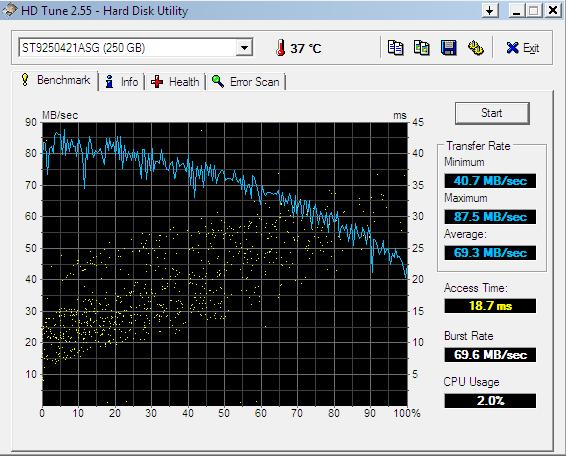
The program I used for benchmarking was HD Tune 2.55. I tested the computer both in normal and in safe mode, but I’m only posting the results gotten in safe mode, because they are the ones that I consider more reliable, since in safe mode the computer is only running the most basic programs and other software won’t interfere by using the hard disk while it’s being tested. Anyways, here’s the results of my “traditional” hard disk drive:

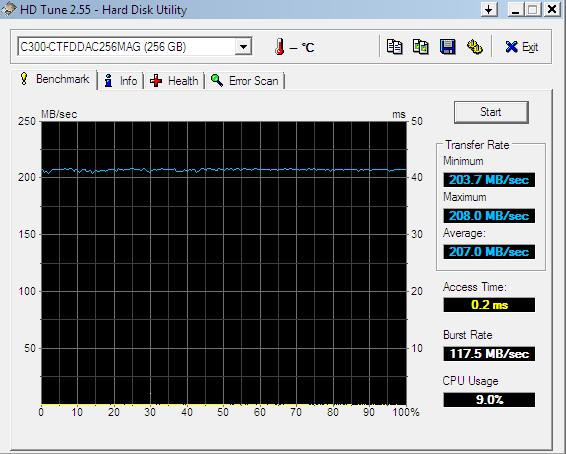
The blue line in the graph represents the data transfer rate over the course of the test. It fluctuated between 40 and 87.5 Megabytes per second, with an average of almost 70. Not bad for a traditional hard disk, especially since it belongs in a laptop. But now let’s see the same laptop, with a solid state drive instead of the traditional hard disk drive:

You can immediately see from the graph that this is a very different animal. The data transfer rate was between 203 and 208 Megabytes per second! Very impressive. And look at the access times! 18.7 milliseconds for the traditional hard disk drive against 0.2 milliseconds for the solid state drive!

As covered in earlier articles, a computer is as fast as its slowest component. And with the way different components have evolved over time, the secondary storage device (hard disk drive) has become the slowest component, generally speaking. But now, with the newest generation of solid state drives, there’s been a step forward towards a more balanced performance of all components.

How does this translate in the actual, normal, everyday use of the laptop? When starting the computer, from the moment the power button is pushed to the moment when the Windows login screen is available, the time went from 80 to 42 seconds! similarly proportional many applications and files were opening that much faster. It is without a doubt the single most noticeable upgrade a computer can get (as long as it’s not too old). Again, especially true for portable computers.

The only thing that is not small and compact about these solid state drives is the price. True, the one I got is (presently) the second fastest in the world, and at its biggest available size. But I could have bought a low-end, basic laptop with that money. So as usual you have to pay to play. Yet with how expensive it was, I feel I got my money’s worth. AND when I upgrade to a newer laptop, this solid state drive is going into it.

Windows Updates for March ’11

As usual on the second Tuesday of every month, Microsoft is releasing a batch of updates this Tuesday the 8th.  A relatively small one, only 2 updates for Windows and 1 for Office are been released. 1 update is labeled critical, the other 2 important.

Worth mentioning also is the fact that in the updates department, for the past 2 weeks Windows 7 Service Pack 1 has been available for download. A service pack is a collection of security, stability and performance patches all condensed into one file. Normally service packs have respectable sizes and Windows 7 SP1 is no exception. In fact, it is arguably the biggest service pack I have seen.

I always recommend keeping your computer up-to-date on the latest Windows and any other key programs’ patches as a mean to ensure resilience to computer vulnerabilities exploited by malware creators and hackers. See this article for more information.